What is Gitflow?
Gitflow is an alternative Git branching model that involves the use of feature branches and multiple primary branches. Compared to trunk-based development, Gitflow has numerous, longer-lived branches and larger commits. This approach has been chosen due to project complexity and lack of automated test, it also gives more control in release process .
Under this model, developers create a feature branch and delay merging it to the main trunk branch until the feature is complete. These long-lived feature branches require more collaboration to merge and have a higher risk of deviating from the trunk branch. They can also introduce conflicting updates but gives more flexibility in delivery.
How it works
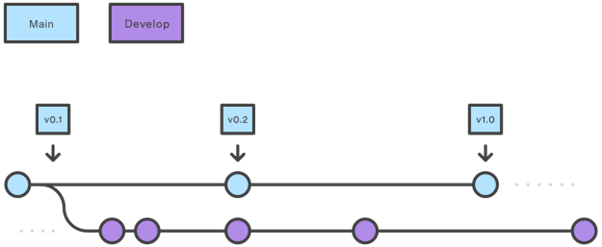
Instead of a single main branch, this workflow uses two branches to record the history of the project. The main branch stores the official release history, and the develop branch serves as an integration branch for features. It's also convenient to tag all commits in the main branch with a version number.
Feature branches
Each new feature should reside in its own branch, which can be pushed to the central repository for backup/collaboration. But, instead of branching off of main, feature branches use develop as their parent branch. When a feature is complete, it gets merged back into develop. Features should never interact directly with main.
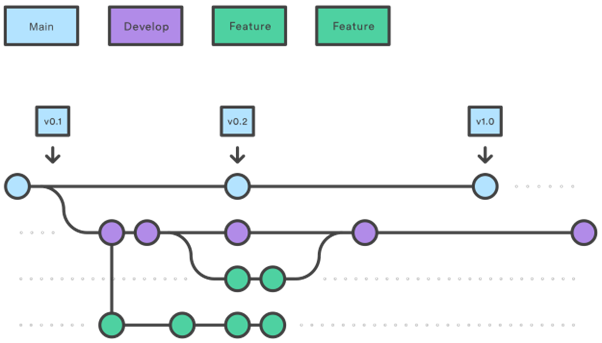
Note that feature branches combined with the develop branch is, for all intents and purposes, the Feature Branch Workflow. Feature branches are generally created off to the latest develop branch.
Release branches

Once develop has acquired enough features for a release (or a predetermined release date is approaching), you fork a release branch off of develop. Creating this branch starts the next release cycle, so no new features can be added after this point—only bug fixes, documentation generation, and other release-oriented tasks should go in this branch. Once it's ready to ship, the release branch gets merged into main and tagged with a version number. In addition, it should be merged back into develop, which may have progressed since the release was initiated.
Using a dedicated branch to prepare releases makes it possible for the team to polish the current release while other team members continues working on features for the next release.
Once the release is ready to ship, it will get merged it into main and develop, then the release branch will be deleted. It’s important to merge back into develop because critical updates may have been added to the release branch and they need to be accessible to new features. If your organization stresses code review, this would be an ideal place for a pull request.
Hotfix branches
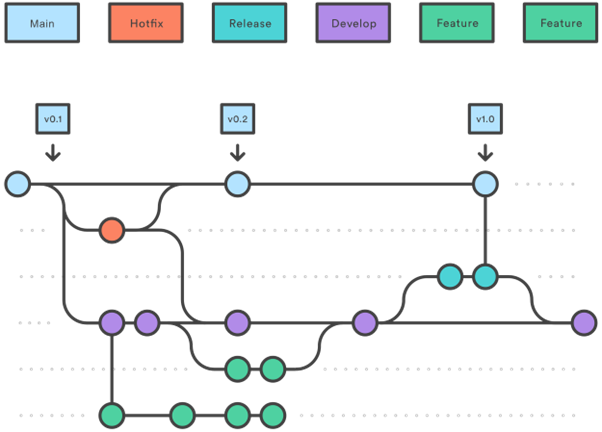
Maintenance or “hotfix” branches are used to quickly patch production releases. Hotfix branches are a lot like release branches and feature branches except they're based on main instead of develop. This is the only branch that should fork directly off of main. As soon as the fix is complete, it should be merged into both main and develop (or the current release branch), and main should be tagged with an updated version number.
Having a dedicated line of development for bug fixes the team address issues without interrupting the rest of the workflow or waiting for the next release cycle.
Release process flows
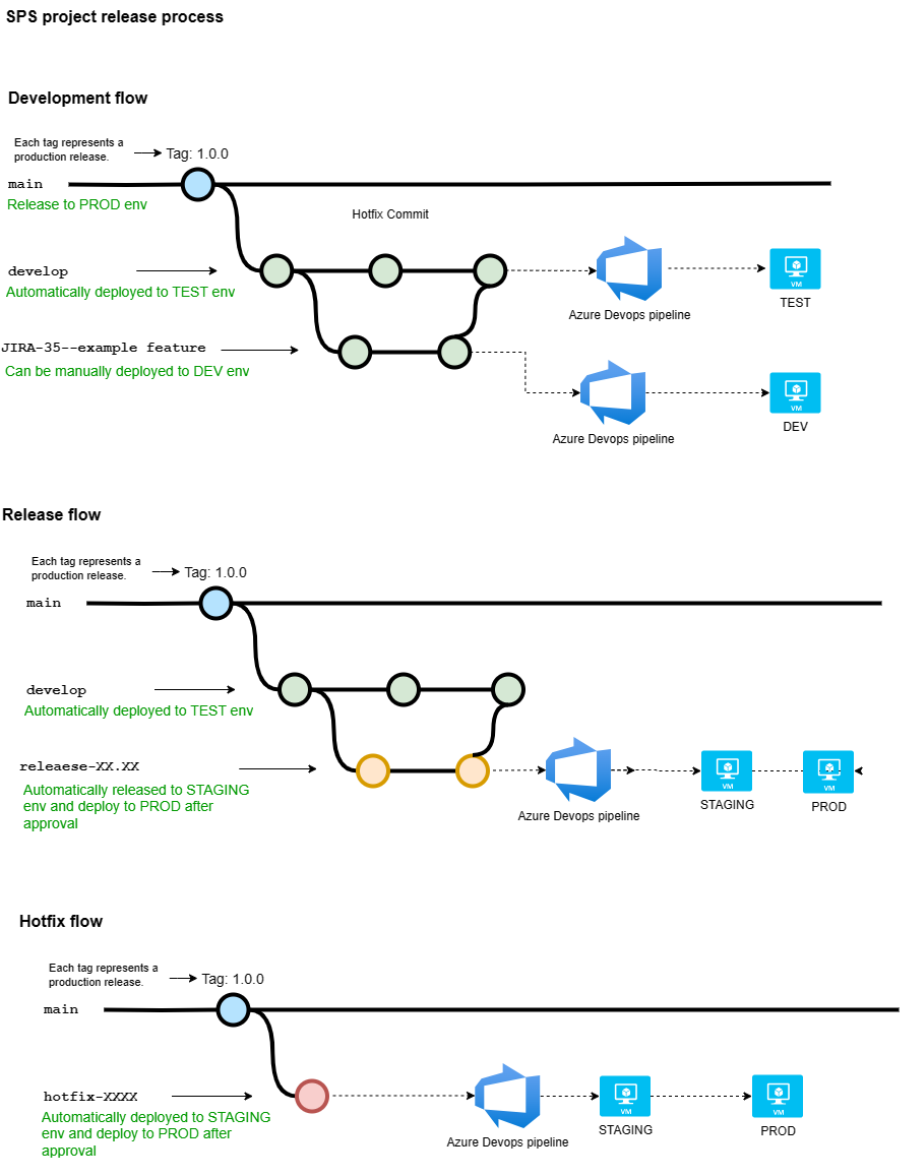
Summary
Some key takeaways:
The workflow is great for a release-based software workflow. Gitflow offers a dedicated channel for hotfixes to production.
The overall flow of Gitflow is:
1. A develop branch is created from main
2. A release branch is created from develop
3. Feature branches are created from develop
4. When a feature is complete it is merged into the develop branch
5. When the release branch is done it is merged into develop and main
6. If an issue in main is detected a hotfix branch is created from main
7. Once the hotfix is complete it is merged to both develop and main
Environments
DEV
Frontend: https://dev.satellitephonestore.com/
Host: 10.100.110.7
DEV2
Frontend: https://dev2.satellitephonestore.com/
Host: 10.100.110.7
DEV3
Frontend: https://dev3.satellitephonestore.com/
Host: 10.100.110.7
DEV4
Frontend: https://dev4.satellitephonestore.com/
Host: 10.100.110.7
DEV5
Frontend: https://dev5.satellitephonestore.com/
Host: 10.100.110.7
DEV6
Frontend: https://dev6.satellitephonestore.com/
Host: 10.100.110.7
TEST
Frontend: https://test.satellitephonestore.com/
Host: 10.100.110.4
UAT
Frontend: https://uat.satellitephonestore.com/
Host: 10.100.110.4
UAT (Public alias)
Frontend: https://uat.connectasatlabs.com/
PROD
Frontend: https://www.satellitephonestore.com/
Was this article helpful?
That’s Great!
Thank you for your feedback
Sorry! We couldn't be helpful
Thank you for your feedback
Feedback sent
We appreciate your effort and will try to fix the article